
This page explains how to properly mark a student as Withdrawn when their time with your program has ended. Doing this keeps your active student list accurate, ensures your reports reflect real enrollment changes, and helps you understand why students leave. Marking Students with a withdrawal closes out a their journey so future enrollment and retention numbers stay clean and trustworthy.
How Foundation Roster thinks about Withdrawals #
In Foundation Roster, each Student represents one complete education journey. Marking a student as Withdrawn is how you officially close out that journey. A child may return to your program later, but that return is treated as a new journey with its own start date, outcomes, and reporting history. This approach keeps enrollment, withdrawal, and retention reports accurate and easy to understand.
The Withdrawal Reason plays an important role because it feeds key reports, including the Enrollment and Withdrawal report and the Average Student Retention report. Over time, these reasons help you spot trends and make better decisions about scheduling, staffing, and program design.
Marking a Student as Withdrawn #
- In the Student Grid, find the student who is leaving or has already left your program.
- In the Profile section, click the Edit link.
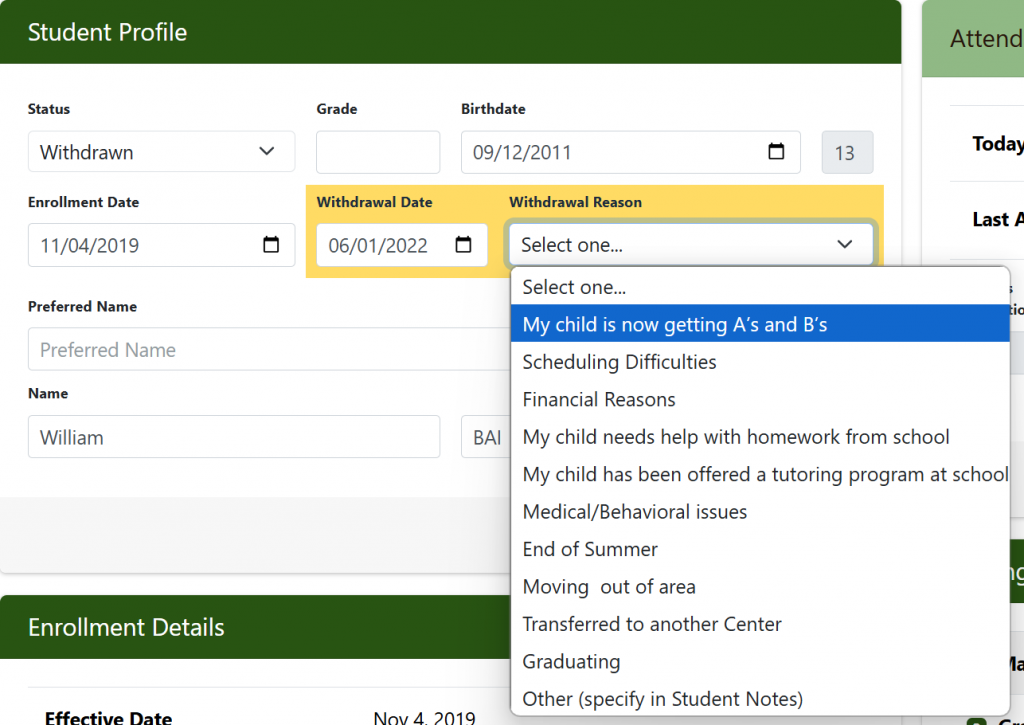
- In the Status field, select Withdrawn.
When you do this, the Withdrawal Date and Withdrawal Reason fields appear. - Complete the withdrawal information.
Choose the correct Withdrawal Date and select the most accurate reason. Note: At this time, withdrawal dates cannot be set in the future. - Click Save.
Foundation Roster automatically adds a note to the student record showing that the status changed to Withdrawn.
After Saving #
Once saved, the student is no longer considered active. If the student still appears in your Current Students list, click the Refresh button on the tab. The student will then fall off the list.
This process ensures each student journey has a clear end, your active roster stays accurate, and your reports reflect what is really happening in your business.


